Markup Calculator
Result:
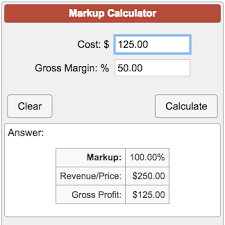
What is a Markup Calculator?
A markup calculator is an online or app-based tool that determines the selling price of a product or service by adding a markup percentage or fixed amount to the cost price. The cost price includes direct costs (e.g., materials, labor) and indirect costs (e.g., rent, utilities), while the markup ensures profit and covers additional expenses like taxes or marketing.
Unlike a margin calculator, which focuses on profit as a percentage of selling price, a markup calculator uses cost as the base. For example, a ₹100 item with a 50% markup results in a ₹150 selling price, ensuring ₹50 profit. In India, where GST (5-28%) impacts pricing, calculators adjust for tax compliance. Globally, markup calculators help retailers and freelancers set prices in USD, EUR, or other currencies, factoring in local taxes like U.S. sales tax (5-10%).
Aurexa Finance’s markup calculator is free, ad-free, and user-friendly, requiring inputs like cost price, desired markup percentage, and optional taxes. It outputs the selling price, profit, and markup rate, ideal for small businesses, freelancers, or e-commerce sellers. For instance, a ₹5,000 product with a 40% markup yields a ₹7,000 selling price, with ₹2,000 profit. In 2025, with e-commerce growing 15% in India and 10% globally, this tool ensures competitive pricing without sacrificing margins. It’s a must-have for Indian MSMEs or global sellers navigating dynamic markets.
(Image Suggestion: Screenshot of Aurexa’s markup calculator interface with cost and markup inputs. Alt text: “Aurexa Finance markup calculator showing selling price for a ₹5,000 product in 2025.”)
Why Use a Markup Calculator?
A markup calculator offers critical advantages for businesses and individuals in 2025:
- Accurate Pricing: Ensures selling prices cover costs and deliver profit, e.g., ₹10,000 cost with 30% markup yields ₹13,000.
- Competitive Edge: Helps price competitively without undercutting profits, vital in India’s retail sector with 12% growth.
- Tax Compliance: Adjusts for GST (India) or sales tax (U.S.), avoiding penalties.
- Time Efficiency: Instant calculations vs. manual math, saving hours for busy entrepreneurs.
- Scenario Analysis: Test different markup rates (e.g., 20% vs. 50%) to optimize pricing.
- Profit Planning: Aligns pricing with financial goals, like doubling revenue for startups.
For Indian sellers, where input costs rose 5% in 2024, calculators prevent underpricing. Globally, Shopify reports 30% of e-commerce failures stem from pricing errors, making calculators essential. For freelancers, it ensures hourly rates cover taxes and expenses. Whether you’re a D2C brand in Bangalore or a retailer in London, this tool maximizes profitability with minimal effort.
How a Markup Calculator Works
The calculator uses simple inputs to compute the selling price:
- Cost Price (C): Total cost of production or acquisition (e.g., ₹1,000).
- Markup Percentage (M%): Desired profit over cost (e.g., 40%).
- Optional Taxes: GST or sales tax rates.
It applies the markup formula to output:
- Selling price.
- Profit amount.
- Effective markup rate post-taxes.
For example, a ₹2,000 product with a 25% markup results in a ₹2,500 selling price (₹500 profit). Aurexa’s tool enhances this with:
- Visual graphs of cost vs. profit.
- Tax adjustments (e.g., 18% GST adds ₹450 to ₹2,500, making final price ₹2,950).
- Multi-currency support (INR, USD, EUR).
The calculator iterates for bulk pricing or variable costs, ideal for wholesalers or e-commerce. In 2025, with real-time data integration, it pulls market rates to suggest competitive markups, ensuring accuracy for Indian and global users.
The Formula Behind Markup Calculations
The core markup formula is:
Selling Price (SP) = Cost Price (C) × (1 + Markup Percentage (M%) / 100)
Profit = SP – C
Markup % = (Profit / C) × 100
Example: ₹5,000 cost, 50% markup:
- SP = 5,000 × (1 + 0.50) = ₹7,500
- Profit = 7,500 – 5,000 = ₹2,500
- Markup % = (2,500 / 5,000) × 100 = 50%
With taxes (e.g., 18% GST):
- Tax = SP × 0.18 = 7,500 × 0.18 = ₹1,350
- Final Price = 7,500 + 1,350 = ₹8,850
For margin comparison: Margin % = (Profit / SP) × 100 = (2,500 / 7,500) × 100 ≈ 33.33%
In India, GST varies (5% for essentials, 28% for luxury), so calculators adjust dynamically. Globally, U.S. sales tax (5-10%) applies similarly. Manual calculations risk errors; calculators automate for precision.
(Image Suggestion: Graph comparing cost, markup, and selling price for ₹5,000 product. Alt text: “Markup calculator graph showing profit for a ₹5,000 item in 2025.”)
Step-by-Step: Using Aurexa’s Markup Calculator
- Access the Tool: Visit Aurexa Finance Markup Calculator.
- Enter Cost Price: Input total cost (e.g., ₹10,000).
- Set Markup %: Choose desired markup (e.g., 30%).
- Add Taxes (Optional): Include GST or sales tax (e.g., 12%).
- Calculate: View selling price, profit, and margin.
- Analyze Outputs: Check table/graph for cost breakdown.
- Test Scenarios: Adjust markup or taxes for comparisons.
- Download Report: Save for pricing records.
The tool supports bulk calculations (e.g., multiple products) and currency conversions, ideal for Indian exporters or global sellers. It flags GST compliance for India and tax rates for other markets.
Manual Markup Calculation
For hands-on learners:
- Set Variables: Cost ₹2,000, markup 40%.
- Apply Formula: SP = 2,000 × (1 + 0.40) = ₹2,800.
- Calculate Profit: 2,800 – 2,000 = ₹800.
- Add Tax: 18% GST = 2,800 × 0.18 = ₹504; Final Price = ₹3,304.
- Verify Margin: (800 / 2,800) × 100 ≈ 28.57%.
Use Excel for multiple products: SP = C * (1 + M%/100). Calculators eliminate errors, especially for complex tax structures.
Real-Life Examples: Markup Scenarios
Example 1: Indian Retail
Priya sells sarees at ₹3,000 cost, 50% markup.
- SP = 3,000 × 1.50 = ₹4,500
- Profit = ₹1,500
- With 12% GST: ₹5,040 final price Ideal for boutique pricing.
Example 2: U.S. E-Commerce
John sells gadgets at $100 cost, 30% markup.
- SP = 100 × 1.30 = $130
- Profit = $30
- With 8% sales tax: $140.40 final price Perfect for online stores.
Example 3: Freelancer Rates
Anu, a consultant, incurs ₹5,000/month costs, wants 60% markup.
- SP = 5,000 × 1.60 = ₹8,000
- Profit = ₹3,000
- Post-GST (18%): ₹9,440 Ensures sustainable income.
| Scenario | Cost | Markup % | Selling Price | Profit | Final Price (with Tax) |
|---|---|---|---|---|---|
| Indian Retail | ₹3,000 | 50% | ₹4,500 | ₹1,500 | ₹5,040 (12% GST) |
| U.S. E-Commerce | $100 | 30% | $130 | $30 | $140.40 (8% tax) |
| Freelancer | ₹5,000 | 60% | ₹8,000 | ₹3,000 | ₹9,440 (18% GST) |
Benefits of Using a Markup Calculator
- Precision: Avoids pricing errors, ensuring profitability.
- Competitive Pricing: Balances market rates with profit goals.
- Tax Compliance: Incorporates GST/sales tax for legal pricing.
- Scalability: Handles single or bulk products for wholesalers.
- Time-Saving: Instant results vs. manual calculations.
- Global Reach: Supports INR, USD, EUR for exporters.
In India, where 50% of small businesses fail due to pricing issues, calculators are critical. Forbes notes they boost profit margins by 5-10% through optimized pricing.
Risks and Considerations
- Overpricing: High markups (e.g., 100%) may deter customers in competitive markets.
- Underpricing: Low markups risk losses, especially with rising costs (5% in India).
- Tax Errors: Missing GST/sales tax leads to compliance issues.
- Market Dynamics: Ignoring competitors’ prices reduces sales.
- Fixed Costs: Overheads (rent, labor) must be included in cost price.
Use our Profit Margin Calculator to balance markup and margin goals.
Comparing Markup vs. Margin Calculators
- Markup: Profit as % of cost (e.g., 50% markup on ₹100 = ₹150 SP).
- Margin: Profit as % of selling price (e.g., ₹50 profit on ₹150 = 33.33% margin).
- Use Case: Markup for setting prices; margin for analyzing profitability.
- Formula Link: Margin % = [Markup % / (1 + Markup %)] × 100.
Example: 50% markup = 33.33% margin. Calculators clarify this distinction, vital for Indian retailers facing GST complexity.
2025 Pricing Trends and Markup Calculators
- Inflation Impact: India’s 4-5% inflation pushes markups to 30-50% for retail.
- E-Commerce Growth: 15% rise in India’s online sales demands dynamic pricing.
- AI Calculators: Tools suggest markups based on competitor data.
- GST Compliance: Calculators integrate 5-28% GST rates automatically.
- Global Markets: U.S./EU sellers use 20-40% markups for e-commerce.
In India, D2C brands leverage calculators for 10% higher margins.
Tips for Optimizing Markup Strategy
- Research Market: Set markups based on competitors (e.g., 30% for retail).
- Include All Costs: Factor in materials, labor, overheads.
- Adjust for Taxes: Add GST/sales tax post-markup.
- Test Scenarios: Use calculators to try 20-60% markups.
- Monitor Demand: High markups for luxury; low for essentials.
- Dynamic Pricing: Adjust markups for seasonal sales.
- Use Analytics: Track sales to refine markups.
Balance with our Revenue Calculator for growth planning.
Aurexa Finance: Your Free Financial Tools Hub
Explore:
- Profit Margin Calculator: Analyze profitability.
- Revenue Calculator: Forecast sales growth.
- Budget Calculator: Manage business expenses.
Aurexa Finance—“Where Wealth Meets Intelligence”—offers ad-free tools for all.
FAQs
- What is a markup calculator? Computes selling price by adding markup to cost.
- How is markup calculated? SP = C × (1 + M%/100).
- What’s the difference between markup and margin? Markup uses cost; margin uses selling price.
- How does GST affect markup? Added post-markup; e.g., 18% GST on ₹1,000 SP = ₹1,180.
- What’s a good markup for retail? 30-50% in India, 20-40% globally.
- Can freelancers use markup calculators? Yes, to set rates covering costs and taxes.
- Is Aurexa’s calculator free? Yes, no sign-up, supports INR/USD.
- How to avoid overpricing? Research competitors, use calculators for balance.
- Does the calculator handle bulk pricing? Yes, supports multiple products.
- Why use Aurexa’s tool? Free, precise, tax-integrated, mobile-friendly.
Conclusion
A markup calculator is your key to profitable pricing in 2025, ensuring businesses and freelancers thrive in competitive markets. Aurexa Finance’s free tool simplifies pricing, integrates taxes, and supports global currencies, empowering Indian and international users. Start optimizing your prices today—calculate now and boost your profits.